AI Vibe Coding Workshop

Is AI a
productivity tool?

2 / 23
Y Combinator · 2026
1000x

One person. The right tools.
The output of a team of 50.

Companies where entire codebases have zero handwritten code.
The 1000x engineer isn't coming. They're already here.

4 / 23
The Breakdown

How is 1000x even possible?

10x
AI writes the code
Stop typing. Describe what you want — AI produces the file.
×3
Sub-agents in parallel
One prompt fans out to multiple agents working at once.
×3
Skills + MCP servers
Pre-built tools for design, data, deploy — no glue code.
×3
Templates & design systems
Don't start from blank. Stitch, shadcn, Supabase auth — ready-made.
×4
CI/CD on autopilot
git push → live in 60s. No DevOps team, no waiting.
10 × 3 × 3 × 3 × 4 = 1,080x 1000x output
"Multipliers stack. One person with the right stack out-ships a team of 50 — not because they type faster, but because they don't type at all."
5 / 24

Not productivity,
but capability

"Make engineers 20% more productive"
One person is more powerful than old structures
"Add copilots to existing workflows"
Build a queryable company
"Ship more features with AI"
Agent Native Software

"The shift is entirely new capabilities — things that were previously impossible are now one person with the right tools."  — Diana Hu, Partner at Y Combinator, 2026

4 / 23
But this isn't a developer story

This is for
you.

🎨
The marketer
with an idea stuck in their head for 6 months — waiting for a dev who never has time.
⚙️
The ops person
drowning in repetitive work, knowing there's a better way but lacking the tools to build it.
💼
The business owner
who can't afford a dev team, watching competitors ship while you're stuck writing briefs.
The old model
Have idea
Hire developer
Wait 3 months
Launch
The new model
Have idea
Build it yourself
Ship it today
5 / 23
Your Trainers

Built products. Teach what works.

Marcus Chia
Marcus Chia
Full Stack Design Engineer · AI PM
Co-Founder, SuperAgentK Co-Founder, SuperCFO
10+ years in UX research and product design for SaaS. Embedded with design and research teams to shape how they build — now turns those insights directly into shipped products through vibe coding.
Warren Leow
Warren Leow
Founder, AITraining2U PLT
100,000 Malaysians Mission Enterprise AI Enablement
Drives AITraining2U's mission to equip 100,000 Malaysians with practical AI skills — hands-on with AI agents, automation and applied analytics for enterprise teams.
"If you're thinking 'this isn't for me' — that's exactly why you're here."
6 / 24
The Receipts

Built, not taught. Every day.

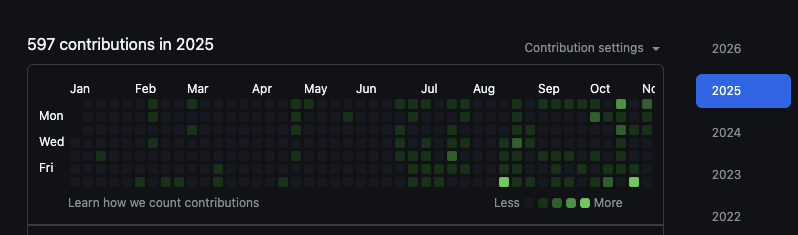
2025 597 contributions
597 GitHub contributions in 2025
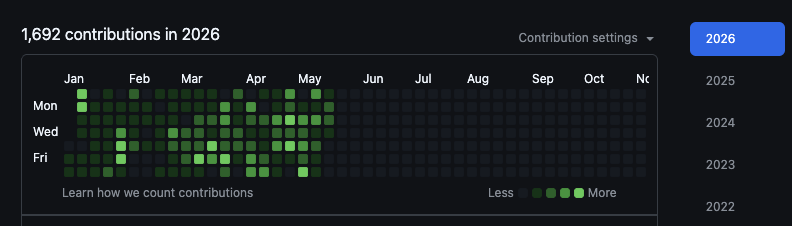
2026 (Jan–May) 1,692 contributions
1,692 GitHub contributions in 2026
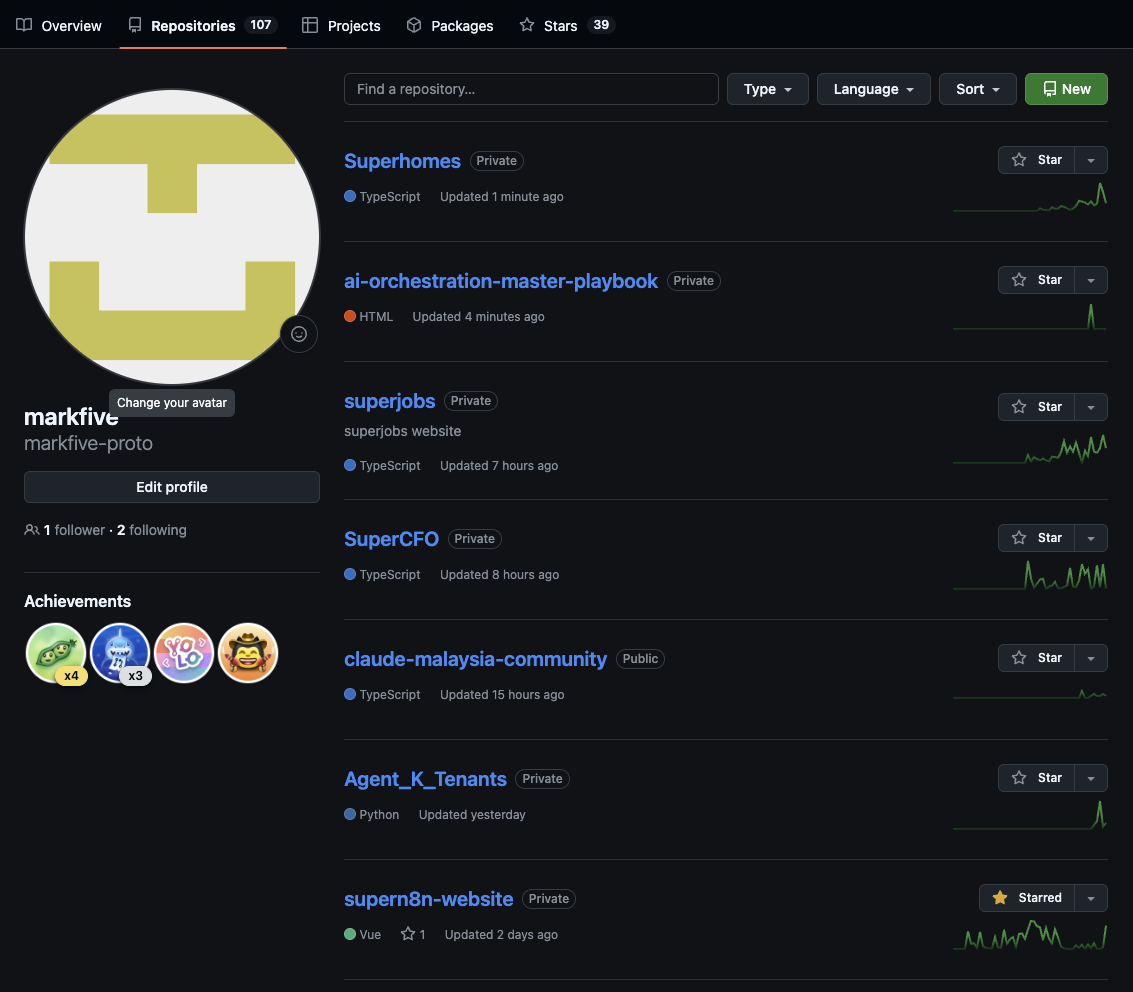
107
repositories
github.com/markfive
GitHub repositories — Superhomes, SuperCFO, agent projects
Everything you see in these slides — built here.
AI Builder Journey
The AI Builder Journey

From writing HTML pages to project-level harness.

Phase 1
📄
HTML Pages
Write dashboard websites. Plain HTML, CSS, SVG. Single-page apps. Learn the craft of describing what you want.
You build
• Landing pages & dashboards
• Forms, tables, navigation
• Responsive layouts
• First AI-assisted edits
Phase 2
🔌
Full Stack + MCP
Connect databases, APIs, auth. MCP servers let AI directly control tools — no copy-paste.
You connect
• Supabase / Firebase databases
• Auth & user management
• MCP servers (Playwright, GitHub)
• Agent skills & automation
Phase 3
🏗️
Project Harness
Full project orchestration. Multi-agent systems, CI/CD autopilot — git push → live in 60s.
You orchestrate
• Multi-agent coordination
• CI/CD on autopilot
• Design systems & templates
• Production deployment at scale
Building deeper →
"Every AI builder starts with a single HTML page. The journey isn't about learning to code — it's about learning to harness AI to build bigger than you can alone."
7 / 23
Definition

What is Vibe Coding?

Andrej Karpathy
Andrej Karpathy
Coined the term · Feb 2025
"There's a new kind of coding I call 'vibe coding', where you fully give in to the vibes, embrace exponentials, and forget that the code even exists."
The architect, not the bricklayer
You design the building. AI lays the bricks. Your domain knowledge is the plan — AI executes it.
Describe intent, not syntax
You write what you want in plain language. AI generates working code from your description.
No background needed
You don't need to understand every line. You need to understand the problem and the user.
Ship in hours, not weeks
Go from idea to live deployed URL in a single workshop session. That's the vibe coding promise.
3 / 23
Mindset

The Shift: From Coding
to Describing

Shift 01
I need to code
I need to describe
Your job is articulating intent clearly. The better you describe, the better the output.
Shift 02
AI is a tool
AI is a collaborator
Think of AI as a junior developer — fast, tireless, eager to please, but needs clear direction.
Shift 03
Non-technical
Domain expert with superpowers
Your industry knowledge IS your advantage. A marketer who knows their audience can build tools a developer never would think of.
6 / 23
Decision Framework

When to Vibe Code

Vibe coding works best when all three are true:

🎯
Condition 1
You have a clear problem
You can describe what needs to be built in a few sentences. Vague ideas lead to vague outputs.
"A dashboard that shows monthly sales by region" ✓
"Something for sales" ✗
👤
Condition 2
You have a specific user
You know who will use this — your team, customers, or yourself. The user shapes every design decision.
"5 account execs who use spreadsheets" ✓
"My users" ✗
Condition 3
You need a v0 fast
Speed to first version matters more than perfection. Get something working, test it, and iterate.
Ship in hours. Polish later.
Perfect = never shipped ✗
Possibilities

What Can Be Vibe Coded?

Starter
Landing Pages
Marketing sites, product pages, event registrations
Starter
Custom Scripts
Automate repetitive tasks, data processing, file handling
Starter
Personalized Dashboards
KPI trackers, CSV visualizers, live data monitors
Starter
Browser Plugins
Chrome extensions, sidebar helpers, page scrapers
Intermediate
Custom Internal Software
Admin panels, ops tools, team workflow apps
Intermediate
AI Agents
Autonomous workflows, chatbots, task runners
Intermediate
MCPs
Model Context Protocol servers — connect AI to your tools and data
Advanced
SaaS Products
Subscription tools, booking systems, customer-facing apps
Advanced
Mobile Apps
React Native / Expo — real iOS & Android, deployed to stores
Advanced
Full-Stack Products
Auth, database, API, payments — complete end-to-end software
5 / 23
The Landscape

The Vibe Coding Toolkit

Vibe Coding Toolkit
🌐
Browser-Based
Zero install. Prompt → preview → deploy in one tab.
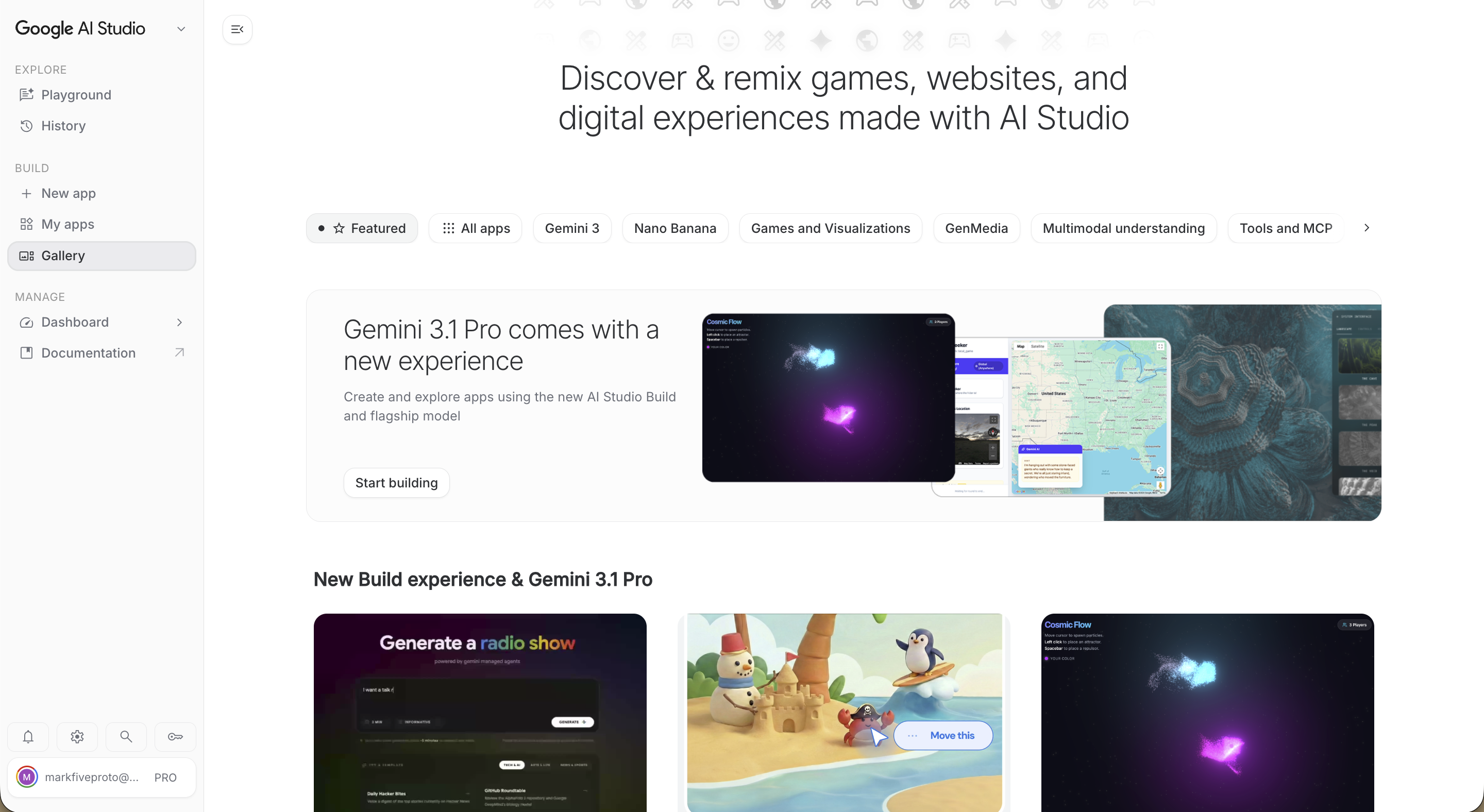
v0 Bolt.new Lovable Replit Google Stitch AI Studio
💻
IDE-Based
AI baked into the editor. Real codebase, real refactors.
Cursor Windsurf Google Antigravity Zed GitHub Copilot
⌨️
CLI-Based
Agentic mode. Multi-step jobs that run in the background.
Claude Code Gemini CLI Codex CLI Aider
Plug-In Backbone
Same tools, every project.
🗄️
Database & Auth
Supabase · Firebase
☁️
Hosting / Deploy
Vercel · Netlify · Cloudflare
🐙
Source & CI
GitHub · GitHub Actions
Frontend → Backend → Database → Hosting → GitHub flow diagram
Universal Process

The Vibe Coding Workflow

Every great vibe-coded product follows this loop — from idea to shipped.

01
📋
Define
Write a clear PRD / brief
02
✍️
Prompt
Turn brief into AI instructions
03
Generate
AI creates the code
04
👁️
Review
Check output, test it
05
🔄
Iterate
Refine with follow-up prompts
06
🔌
Connect
Wire up database & APIs
07
🚀
Deploy
Push to GitHub → Vercel
08
🧪
Test
QA — browser & manual
09
🎨
Polish
UX, responsive, visuals
10
🏆
Ship
Share the live URL
Choose Your Stack

Which Tool Should I Use?

Quick prototype or single-page app?
⚡ YES
AI Studio
+ GitHub Pages
↓ NO
Does it need a database?
✗ NO
AI Studio
+ Vercel
↓ YES
Simple data — lists, flat records?
✓ YES
Firebase
+ AI Studio
↓ NO — Complex data, relationships, SQL
🏆 Supabase + Vercel — Full-stack production app
Tools at a glance
AI Studio
aistudio.google.com
🐙
GitHub Pages
Free static hosting
🔥
Firebase
Simple NoSQL DB
🗄️
Supabase
SQL + Auth + APIs
Vercel
Deploy + CI/CD
M1 · PRD Prompt — Copy & Adapt This

Your first prompt is your PRD.

❌ Weak
"Build me a quiz app"
// Context first — who you are and who this is for Context: I run a [type of business] in Malaysia. My [customers/team] currently [pain point]. // Task — one clear thing to build Task: Build a [what it does] that [core function]. It should [key behaviour / outcome]. // Keywords — the technical terms that guide AI Keywords: responsive, single-page, no backend, mobile-first, [your specific requirements] // Format — how the output should be delivered Format: Single HTML file, embedded CSS + JavaScript.
7 / 23
Framework

The Prompt Formula

Context
+
Task
+
Keywords
+
Constraints
+
Format
=
Great Output
Context
Who you are, your industry, your users. AI performs better when it understands your world.
Task
The specific thing you want built. One task per prompt. Be precise.
Keywords
Technical terms and terminologies that guide AI to the right approach — e.g. "responsive", "single-page", "CRUD".
Constraints
What you don't want: no frameworks, no external APIs, mobile-first, under 200 lines.
Format
What the output should look like: a single HTML file, a JS function, a Sheets script, JSON.
8 / 23
01
LAB 01
Hands-On · 45 min

Interactive
Quiz Builder

Build a 5-question interactive quiz that scores answers, reveals a personalised result, and is deployed live. No templates — you prompt it from scratch.

You'll build
Scored quiz + result reveal
Output
Live URL you can share
Tools
AI Studio + Vercel
Lab 1
LAB 01 · PROMPT

Copy this. Paste it. Make it yours.

// Paste this into AI Studio or Claude Context: I'm building a quiz for [your topic/business]. My audience is [who will take this quiz]. Task: Build a 5-question interactive quiz that: - Shows one question at a time with 4 answer options - Tracks score and shows a progress bar (Q1 of 5) - Reveals a result at the end based on score (5–8: Beginner 9–14: Intermediate 15–20: Expert) - Shows a 2-sentence summary for each result level Keywords: single-page, no backend, animated transitions, score calculation, result card, mobile-friendly Format: Single HTML file, embedded CSS + JavaScript only.
After it generates
Test every question. Check that scoring works. Then deploy to Vercel for your Live URL #1.
Make it yours
Change the topic, colours, and result labels to match your actual business or idea.
Lab 1
M2 · Scaffold

PRD → Running App

01
Paste the PRD as your first prompt
The entire PRD becomes your opening message. The more structured it is, the better the scaffold.
02
Scope the first build (MVP only)
Start with core functionality only. One screen, one action, one outcome. Resist adding features in round one.
03
Add 1–2 features via follow-up prompts
Once the scaffold works, iterate. "Now add a filter for category." Each prompt is one addition.
Common first-scaffold mistakes
Prompting the full app in one go
Not specifying the tech stack
Accepting the first output without testing
Skipping mobile responsiveness check
Output target
A working preview you can click through and test. Not perfect — working. Ship first, polish second.
9 / 23
02
Hands-On · 30 min
LAB 02

Interactive
Landing Page

Take your quiz and turn it into a full landing page — hero section, copy that converts, CTA button, and a layout that works on mobile. No templates. You direct the design.

You'll build
Hero + copy + CTA + mobile layout
Output
Polished live URL #2
Skills used
Persona, before/after, deploy
Lab 2
Design That Works

5 UX Principles Every Builder Needs

👁️
Visual Hierarchy
Bigger = more important. Bold colours for primary actions. More space = more attention. Users scan before they read.
🔁
Consistency
Same spacing system (4/8/16/24/32px). Same colour palette. If click opens a modal once, it does everywhere.
💬
Feedback
Button states: hover, loading, disabled. Success/error messages. Skeleton loaders. Confirmation for destructive actions.
✂️
Simplicity
Only ask for info you actually need. Pre-fill when possible. Reduce clicks. Use smart defaults. Less is always more.
🔤
Clarity
Button labels are verbs: "Save Contact" not "Submit". Errors explain what went wrong AND how to fix it. Empty states tell users what to do next.
"When something looks wrong in your app, it's almost always one of these five principles being violated. Prompt AI to fix it with the principle name."
M3 · Style & Iterate

Know Your User.
Style for Them.

Persona template
"[Name], [age]. [Role]. Uses [device]. Handles [volume] per day. Biggest pain: [specific friction]. Needs [outcome] in [time]."
1
Who are they? Role, industry, tech level
2
Their #1 pain? What makes them open your tool
3
Device & context? Phone at 11pm? Desktop in office?
4
Success moment? The exact moment the problem is solved
Before your app
Write every manual step. Count tabs, copy-pastes, waiting. That's your friction baseline.
After your app
Map the new journey. Where does friction still exist? That gap is your product backlog.
Use the gap to iterate
Each friction point becomes a follow-up prompt: "Add a step where the user pastes X and it auto-fills Y."
10 / 23
M4 · Debug Prompt — Use This Every Time

Something broke. Here's your escape.

// Paste this when something breaks Error: [Paste the exact error message here] Expected: [What you wanted to happen] Actual: [What is happening instead] Context: [Last change you made / what you tried] Ask: Fix this without breaking anything else.
Golden rule
Never paste the full code and say "fix it." Describe the error, the expected behaviour, and what you tried.
01
Read it literally — paste error, ask "what does this mean?"
02
Isolate — "ignore everything else, just fix the [broken part]"
03
Start fresh — 3+ loops? Rewrite that section from scratch.
04
Checklist — "give me 5 things that could cause this"
05
Rubber duck — explain it out loud. You'll find it yourself.
11 / 23
M5 · Deploy

Localhost is not a product.
A live URL is.

Step 01
npm install -g vercel
Install Vercel CLI globally. One-time setup.
Step 02
vercel
Run in your project folder. Preview URL in 60 seconds.
Step 03
vercel --prod
Promote to production. Share your live URL.
GitHub Auto-Deploy
→ Connect GitHub repo to Vercel dashboard
→ Every git push triggers a redeploy
→ Every PR gets its own preview URL
→ Roll back any deployment in one click
Today's targets
Live URL #1 — your project
Live URL #2 — dashboard build
→ WhatsApp your URL before lunch
12 / 23
Superpower Unlocked

MCP Servers — AI with Real Access

MCP (Model Context Protocol) lets AI directly control your tools — not just suggest code, but actually act.

🗄️
Supabase MCP
Create tables, write queries, manage data, run migrations — AI controls your database directly.
🔥
Firebase MCP
Manage Firebase projects, read/write data, configure auth and rules through AI prompts.
🎭
Playwright MCP
AI controls a real web browser — navigate pages, click buttons, fill forms, take screenshots.
🐙
GitHub MCP
Create repos, manage issues, open pull requests — AI acts on your codebase directly.
Vercel MCP
Deploy apps, check logs, manage projects — AI deploys your work without you touching the CLI.
What this means

Without MCP: AI writes code → you copy-paste → you run it. With MCP: AI executes directly. You describe "create a users table with email and name columns" — AI connects to Supabase and does it. The gap between idea and done collapses.

03
LAB 03

Custom System
with Database

Build a full system that remembers — a custom internal tool connected to a live database. Users, records, and data that persist. This is where you go from web page to real software.

🗄️
Database
Supabase
Build
CRUD App
🚀
Deploy
Vercel + GitHub
🏆
Output
Live URL #3
90 min · Guided support throughout
Lab 3
Post-Lunch · Marcus-Led

Dashboard Build —
CSV to Live Charts

Step 01
Import CSV
Upload your spreadsheet. AI parses and structures it automatically.
Step 02
Add Charts
Bar, line, pie — prompted, not coded. Describe what you want to visualise.
Step 03
Add Filters
Date ranges, dropdowns, search. "Add a filter for region" — that's the whole prompt.
Step 04
Deploy
Push to Vercel. Share Live URL #2 with the room before we move on.
13 / 23
Showcase B · Seeds for Day 2

What Else Can
Be Vibe Coded?

📱
React Native / Expo
Full iOS & Android apps from one codebase. Deployed to the App Store.
🌐
Chrome Extensions
Sidebar tools, page scrapers, AI writing helpers — all in a single prompt session.
Google Apps Scripts
Automate Sheets, Docs, Gmail, Calendar. Logic in plain language, AI generates the code.
🎮
Three.js / WebGL
Immersive 3D in the browser. Product showcases, data visualisations, interactive art.
"The limit isn't the technology. It's the clarity of your idea." — Tomorrow we go further.
15 / 23
Honest Assessment

The Pros & Cons

✓ Advantages
Speed
Idea to working app in hours, not weeks. No syntax, no frameworks, no setup hell.
Accessibility
Anyone can build — product managers, designers, marketers, founders. No CS degree needed.
Fast Iteration
Changing direction is cheap. Don't like the layout? Describe what you want instead.
Lower Cost
For prototypes and internal tools, skip hiring a developer entirely.
Learning Tool
Even if you learn to code later, vibe coding teaches you to think in design and UX first.
⚠ Limitations
Code Quality
AI-generated code may be verbose, unoptimised, or use outdated patterns.
Complex Logic
Multi-step business logic and intricate state management are hard to express in prompts.
Debugging Difficulty
When something breaks, you may not understand the code well enough to fix it cleanly.
Security Risks
AI may not follow security best practices by default. Always review auth and data handling.
Ceiling Effect
Simple apps are easy. As complexity grows, vibe coding alone becomes a bottleneck.
Day 1 Closing Activity

Project Scoping
Lock

Pitch your Day 2 idea in one sentence. Marcus reviews each scope live. A locked brief is what you build tomorrow.

Your one-sentence pitch
"I'm building [product] for [user] that solves [pain] so they can [outcome]."
Scope check criteria
✓ Can this be built in one day?
✓ Is the user specific enough?
✓ Is there a real pain to solve?
Tonight's homework: Refine your PRD. Come tomorrow with a structured brief, not just an idea.
Lock It In 🔒
16 / 23
Resource Handout

The 4 Core
Prompt Patterns

These four patterns cover 90% of what you'll do with vibe coding. Bookmark this slide.

Pattern 1 · Feature Request
Add: [feature name] Behaviour: [what it does, step by step] Constraint: [don't break X / stay under Y]
Use when adding something new to an existing build.
Pattern 2 · Debug
Error: [exact error text] Expected: [what should happen] Actual: [what's happening] Fix: without breaking anything else
Use when something breaks. Never just "fix it."
Pattern 3 · Refactor
Refactor: [component or section name] Goal: [cleaner / faster / readable] Keep: all existing behaviour identical
Clean up messy code without changing what it does.
Pattern 4 · Deploy Prep
Check: mobile layout, load speed Add: meta title, description, OG tags Output: deploy-ready single HTML file
Run before every deployment. Catches common misses.
17 / 23
Day 1 Complete

You shipped something
real today.

What you built
✓ A live, deployed web project
✓ A data dashboard
✓ A locked Day 2 brief
Tonight's homework
→ Refine your PRD
→ Set up tools
→ Come with questions

See you tomorrow at 9:00 AM sharp.

18 / 23